
Couple widgets for iPhone: which to add, and how
A couple widget is a Home Screen or Lock Screen widget that shows something from your partner: their latest photo, a note, a heart when they think of you, or the days until you meet. It comes from an app you both install and link, and each of you adds the widget on your own phone.
CloserDays is our own app, so weigh what we say about it.
What a couple widget is
An ordinary widget shows your own things: your calendar, your weather. A couple widget shows something your partner did. They send a photo, and it appears on your Home Screen without you opening anything.
That's why they suit long distance. You look at your phone dozens of times a day. A widget turns some of those glances into a moment with them, and neither of you has to stop what you're doing.
Every couple widget works the same way underneath:
- You both install the same app.
- One of you invites the other, and the app links your two accounts.
- Each of you adds the widget to your own Home Screen or Lock Screen.
The third step is the one people skip. Installing the app doesn't put anything on your screen; iPhone asks you to add each widget yourself.
The five kinds, and what each asks of you
Most couple apps mix a few of these. Before you pick an app, decide which ones you'd actually use.
| Kind | What you see | What it asks of your partner |
|---|---|---|
| Photo | The latest picture they sent | Taking photos often enough that it doesn't go stale |
| Note or drawing | A short message or a doodle | Writing something; it stays until the next one |
| Thinking of you | A heart or a count that goes up when they tap | One tap, whenever they like |
| Countdown | Days until you're together | Nothing after the date is set |
| Days together | How long you've been a couple | Nothing at all |
The last two never ask anything of anyone, so they never go stale. The first three are only as alive as the person on the other end. If one of you is a heavy photo-taker and the other isn't, a photo widget can feel lopsided. A tap-based one evens that out.
Home Screen or Lock Screen
The Home Screen has room for a photo or a drawing. The Lock Screen only takes small, mostly monochrome widgets: a number, an icon, a short line of text. So photos belong on the Home Screen, and counts belong on the Lock Screen.
- To add one to the Home Screen: touch and hold an empty spot, tap Edit, then Add Widget, and choose the app.
- To add one to the Lock Screen: touch and hold the Lock Screen, tap Customize, then tap the space under the clock.
- Short on room? Drag one widget on top of another of the same size on the Home Screen to make a stack you can swipe through.
Our countdown widget guide walks through these steps in more detail, with what to do when a widget doesn't update.
Some apps that make them
These are taken from each app's App Store page, which we checked on November 16, 2026. We haven't tested the other apps ourselves, so the descriptions are theirs, shortened.
| App | What its widget shows | Worth knowing |
|---|---|---|
| Locket Widget | Live photos from up to 20 close friends; a separate widget can show photos from one person only | Built for friends first; offers in-app purchases |
| noteit | Notes, pictures and drawings from your linked partner | One job, done simply; offers in-app purchases |
| Widgetable | Many widgets: shared virtual pets, moods, a "miss you" count, and the distance between you | Has a premium subscription; requires iOS 16 or later |
| Couple Widget: Love Countdown | Your days together, with themes and couple photos | Also a shared diary and anniversary reminders |
| CloserDays | The countdown to your next visit, their latest photo, hearts in their sky, days together | Our own app; iPhone only, subscription after a trial |
One thing to check: a widget that shows the distance between you has to know where each of you is. If you'd rather not share your location, look at what each widget needs before you add it.
Pick for the bad weeks
Any widget is fun in the first week. The useful question is what it looks like in a busy month, when one of you is in exams or working nights.
- A photo widget showing a picture from nine days ago can sting more than an empty one.
- A countdown or a days-together counter keeps moving on its own.
- A tap-based widget asks for one second, so it tends to survive a busy week.
A good pair for most couples is one widget that needs nothing (a countdown) and one that needs very little (a heart or a photo). For more small things that survive a busy month, see ideas for the days between visits.
The widgets in CloserDays
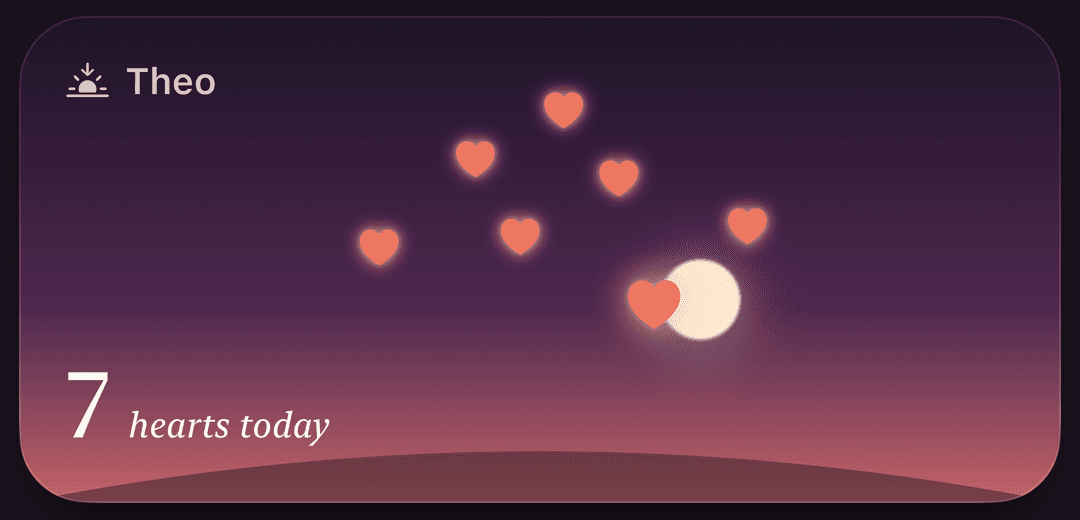
CloserDays is the iPhone app we make for long distance couples. It has four widgets. The countdown, photo and days-together widgets follow the theme you pick in the app; the Hearts widget is always a sky.
| Widget | Sizes | What it shows |
|---|---|---|
| Reunion countdown | Small and medium; three Lock Screen sizes | Days until your next day together |
| Hearts | Small and medium; two Lock Screen sizes | A heart each time they think of you, in a sky that follows their clock |
| Partner photo | Small and large | Their latest photo, which changes when they share one |
| Days together | Small | How long it's been the two of you |
The hearts reset at midnight, so the count is always today's. Nothing in CloserDays uses your location. The limits: it's iPhone only, so you both need one, and after the trial it's a subscription that covers both of you.
Questions
How do couple widgets work?
You both install the same app and link your accounts with an invite. Then each of you adds the app's widget to your own Home Screen or Lock Screen. When your partner sends a photo, a note or a tap, it shows up in your widget.
Do both partners need the app?
Yes. The widget shows what your partner sends from the app, so they need it too. If one of you has an Android phone, check the app's store pages before you both commit: some, CloserDays included, are iPhone only.
Can I put a couple widget on my Lock Screen?
If the app offers a Lock Screen size, yes. Lock Screen widgets are small, so they show a count or a short line rather than a photo. Touch and hold the Lock Screen, tap Customize, and add it under the clock.
Why isn't my partner's photo showing in the widget?
Check that you're linked to each other in the app, then open the app once. iPhone refreshes widgets on its own schedule, so a new photo can take a few minutes to appear.
Keep reading
Sources
- Apple Support: How to add and edit widgets on your iPhone, checked
- Locket Widget on the App Store, checked
- noteit - bff widget on the App Store, checked
- Widgetable: Besties & Couples on the App Store, checked
- Couple Widget : Love Countdown on the App Store, checked
- CloserDays: Couples Countdown on the App Store, checked