
Couple countdown widget on iPhone: how to set one up
A couple countdown widget comes from an app: set the date in the app, then touch and hold your Home Screen, tap Edit, tap Add Widget and choose it. For the same number on both phones, use an app with a shared countdown and set the date in the time zone where you'll meet.
CloserDays is our own app, so weigh what we say about it.
What you need first
The Calendar widget that comes with iPhone shows your next events, not a number of days. So a countdown widget comes from an app. Before you add one, have these ready:
- A date and, if you know it, a time. A rough date is fine; you can change it later.
- The city where you'll meet. The countdown should run on that city's time, not on yours.
- A countdown app with widgets. If you want your partner to see the same count, pick one that shares the countdown between two phones.
The steps below are Apple's own and work for any app's widgets. The examples use CloserDays, the app we make.
Add the countdown to your Home Screen
- Open your countdown app and set the date. In CloserDays, that's the day and the city where you'll be together.
- Go to your Home Screen. Touch and hold an empty spot until the apps jiggle.
- Tap Edit in the top left corner, then tap Add Widget.
- Find the app in the list, or type its name in the search field.
- Swipe to the size you want, then tap Add Widget.
- Drag it where you want it and tap Done.
On an older iPhone that shows a plus button in the corner instead of Edit, tap the plus button. The rest is the same.
Add it to your Lock Screen
A Lock Screen widget is smaller, but you see it every time you pick up your phone.
- Touch and hold the Lock Screen until Customize appears, then tap it.
- Tap Add Widgets, under the clock.
- Tap or drag the countdown into one of the spaces.
- Tap Done.
The row above the clock, where the date sits, takes a widget too. A one-line countdown fits there.
Show the same number on both phones
If you each set up your own countdown, the two can disagree. One of you typed the departure and the other the arrival, or you're far enough apart that the date is a different day for each of you.
A shared countdown fixes that: one of you sets the date, the other joins it, and both widgets count to the same moment. In CloserDays it goes like this:
- One of you sets the day and the city.
- That person sends an invite from the app. It's a link, with a six-character code as a backup.
- The other installs CloserDays on their iPhone, then opens the link to join.
- Each of you adds the widget to your own Home Screen, with the steps above.
From then on, changing the date on one phone changes it on both. If you're comparing apps for this, we wrote up five countdown apps for long distance couples.
Which widget to pick
Most countdown apps offer a small square, a wider one and a Lock Screen version. These are the ones in CloserDays.
| Widget | Where it goes | What it shows |
|---|---|---|
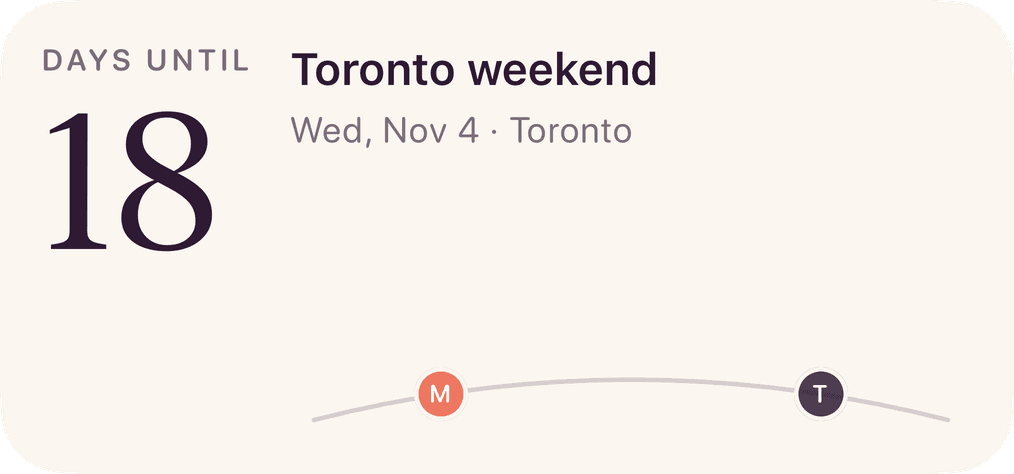
| Reunion countdown | Home Screen (small or medium) and Lock Screen | The days until you're together, with the name of the plan |
| Hearts | Home Screen (small or medium) and Lock Screen | Their sky, and a heart each time they tap "Thinking of you" |
| Partner photo | Home Screen (small or large) | The latest photo they shared with you |
| Days together | Home Screen (small) | How long it's been the two of you |
If you have room for one, take the countdown. If you have room for two, the small countdown next to the small photo is a good pair. For photo, note and heart widgets from other apps too, see our guide to couple widgets for iPhone.
If the number looks wrong
- It hasn't changed since you edited the date. Open the app once, then give it a few minutes. iPhone decides when widgets refresh, and it isn't instant.
- It's one day off. Check the time zone of the date: it should be the city where you meet. Also check that Set Automatically is on under Settings, General, Date & Time on both phones.
- Your partner's widget shows something different. Make sure they joined your countdown and didn't start a second one.
Questions
Does iPhone have a built-in countdown widget?
Not for counting days to a date. The Calendar widget shows your upcoming events, and the Clock app's timers run for hours, not weeks. A days-until widget comes from an app you install.
Can two people share one countdown widget?
Yes, with an app that shares the countdown. One person sets the date, the other joins by invite, and each adds the widget on their own phone. Both widgets then show the same count.
Does my partner need an iPhone too?
For CloserDays, yes: it's iPhone only. If one of you has another kind of phone, our web countdown works in any browser and can be shared as a link.
Why is my countdown widget not updating?
iPhone refreshes widgets on its own schedule. Open the app once so it has the latest date, then wait a few minutes. If it still looks stuck, remove the widget and add it again.