
Long distance relationship countdown: a practical guide
A long distance countdown is one date you both count toward: the next time you're in the same place. Set it in the time zone where you'll meet, keep it somewhere you both see every day, and choose the next date before this one runs out.
CloserDays is our own app, so weigh what we say about it.
Start with a real date
A countdown only works when it points at something. The date doesn't have to be booked, but it has to be written down: "the weekend of the 20th" counts, "sometime in spring" doesn't.
If the plan is still loose, set the earliest date you both believe in and move it when the flights are booked. Moving a date is normal. Having no date is what makes the wait feel endless.
If there's truly no date yet, count something else for now:
- The day you'll decide. "We book on the 1st" is a date too.
- The next long call, if visits are months apart.
- The days you've been together. It counts up, so it never runs out.
Count to a moment, not a day
When you live in different time zones, "the 20th" can be two different days. A flight that lands in Sydney at 7 a.m. on the 20th lands while it's still the afternoon of the 19th in New York. If you each type "the 20th" into your own phone, your numbers won't match, and one of you will be a day off the whole way.
The fix is to count to the moment you'll be together, in the time zone where it happens:
- Use the arrival time, not the departure. The wait ends when you're in the same place.
- Set the date in the city where you'll meet.
- Share that one countdown, so both phones count to the same instant.
You can try this in a browser with our web countdown: pick the date, the time zone where you meet, and send the link.
Put it where you'll both see it
A countdown you have to go looking for stops being looked at. These are the usual places to keep one, with what each is good for.
| Where | Good for | The catch |
|---|---|---|
| A paper chain or wall calendar | Something to touch. Tearing off a link each night is a small ritual. | It lives in one home. Your partner needs their own. |
| An event in your phone's calendar | No setup, and it's already shared if you share a calendar. | It shows the event, not the number of days left. |
| A web countdown link | Works on any phone or computer, with nothing to install. | You have to open it. It isn't on your Home Screen. |
| A shared countdown app with a widget | The same number on both Home Screens, every time you unlock. | You both need the app, and often the same kind of phone. |
Plenty of couples use two: something physical at home, and a widget on the phone for the rest of the day.
When the number is too big
A count of 12 feels close. A count of 140 can feel like a weight, and looking at it every morning doesn't help. A few ways to make a long wait easier to carry:
- Count in weeks. "20 weeks" is the same wait as "140 days", and it changes less often.
- Add a halfway point. A care package, a long call or a film you both watch on the same night gives the middle of the wait a date of its own.
- Leave out the hours and seconds until the last week. They are for the airport, not for month three.
And decide on the next date before the visit ends, even roughly. Going home is easier when the countdown starts again the same day.
What CloserDays does with a countdown
CloserDays is the iPhone app we make for this. One of you sets the day and the city, the other joins with an invite link, and you both see the same count. The sky behind the number starts at night and gets lighter as the day comes closer, until it reaches sunrise on the day itself.
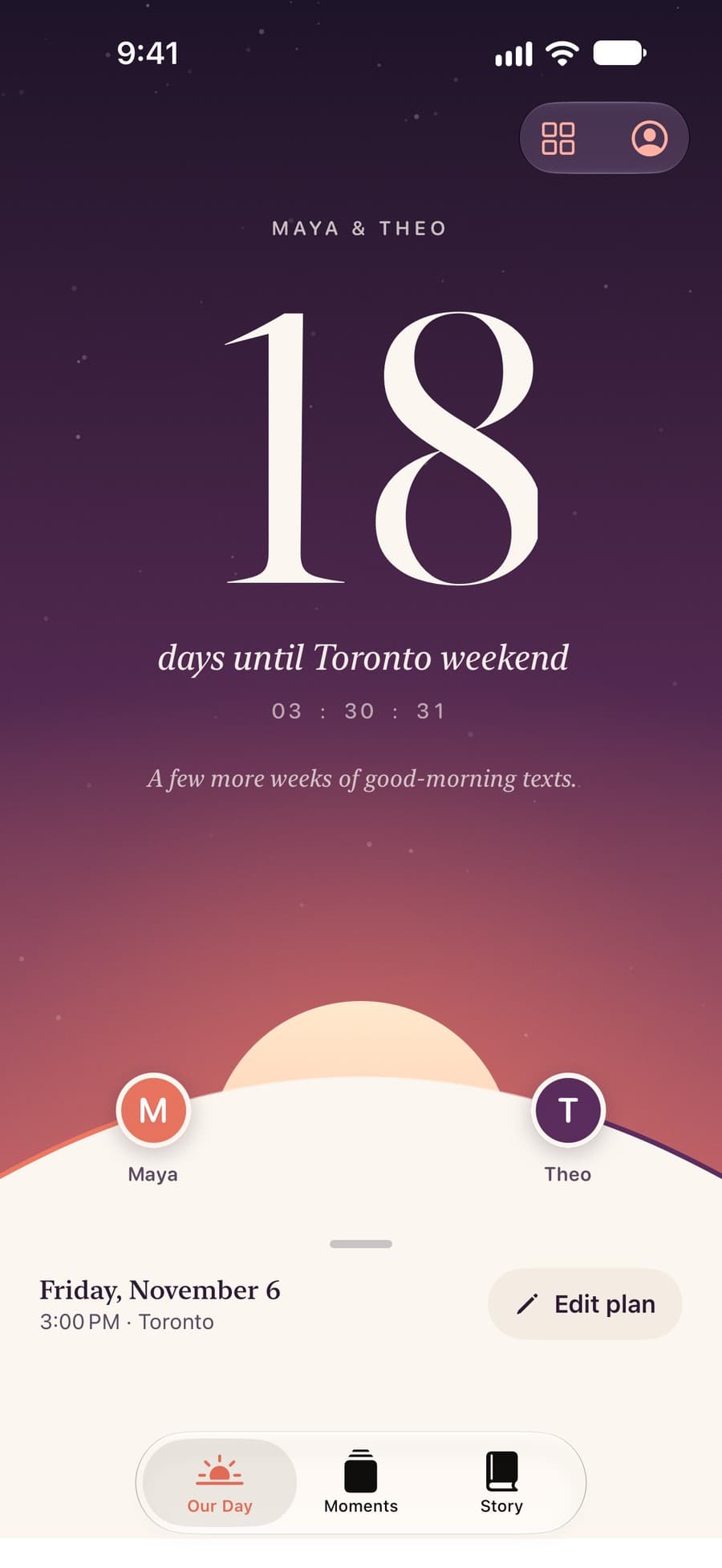
Your partner's local time sits under the countdown, and the count can live on your Home Screen and Lock Screen as a widget. It's built for exactly two people, and it never uses your location.
What it doesn't do: it's iPhone only, so you both need one. And after the trial it's a subscription, though one subscription covers both of you.
Guides on this
- Countdown apps for long distance couples, compared
Five iPhone apps compared on sharing, time zones and widgets, from their App Store pages.
- Couple countdown widget on iPhone: how to set one up
Put the countdown on your Home Screen and Lock Screen, and on your partner's too.
Questions
How do long distance couples count down the days?
Most pick the date of the next visit and keep the count somewhere they see daily: a paper chain, a calendar on the wall, or a countdown widget on the phone. A shared countdown app shows the same number on both phones.
What if we don't have a date for the next visit yet?
Set a date for deciding, such as the day you'll book flights, and count to that. Or count up instead: the days you've been together never run out. Change it to a real countdown as soon as there's a visit to point at.
Should the countdown end on the travel day or when we're together?
When you're together. Use the arrival time in the city where you meet. That way you both count to the same moment, and the number doesn't reach zero while one of you is still on a plane.
Can we share a countdown without installing an app?
Yes. Our web countdown runs in any browser: set the date and the time zone where you meet, then send the link. It won't sit on a Home Screen, but you'll both see the same count.